20mins
Solving The Challenge of Showcasing Multidiciplinary Skills in One Cohesive Platform.
Tools Used

My goal was to build a portfolio that felt both intentional and personal, one that reflects my hybrid skillset (UI/UX + Development), showcases works in progress, and allows potential clients or HR personnel to learn more about me and reach out easily. I used Framer to build and animate the site, with Lean UX principles guiding its development.
The site includes:
A home page under
/worksthat showcases my projects.A personal “Me” page (
/me) with summary about me, contact options, and access to my playground section.A CMS-powered project case study page with flexible formats.
Built-in scroll animations, structured navigation, and responsive cards for work previews.
Industry:
Product Design
Project Duration:
8 Weeks
My Role:
Product Designer, and Developer
Team:
Alone
The Problem
Many portfolios either over-design and under-inform or feel impersonal and static. I wanted to fix three key issues:
Visitors should quickly understand who I am and what I do.
Clients should easily explore my work, filter based on relevance, and preview project details.
The portfolio should reflect personality to stand out authentically.
The Solution
I created a portfolio experience that balances clarity, functionality, and personality through clean structure, thoughtful animations, and interactive navigation.
Key solutions included:
A hero section that communicates my role, with CTAs to view my resume or contact me.
A tabbed Selected Works section (UI/UX vs Dev) with clear card variants for “Published” and “Coming Soon”.
A CMS-powered case study format that follows structured storytelling.
A testimonials section to build credibility.
A comprehensive footer with tools, skills, certifications, and redundant contact CTAs.
A “Playground” feature to showcase personal explorations beyond the presented skillsets.
Consistent scroll animations to enhance engagement.
Design Process
Strategy: Lean UX
Assumptions & Hypotheses
Visitors want to know what I do within 5 seconds.
Separating UI/UX and Dev work will reduce friction for different visitor types.
Including a dedicated “Playground” will humanize me and increase trust.
Scroll animations, if subtle, will enhance focus and reduce bounce.
Build - Measure - Learn
Built directly in Framer with minimal delays.
Released early to peers for feedbacks.
Collected qualitative feedback (DMs, calls, informal user tests).
Iterated structure, copy, and content based on how visitors interacted and responded.
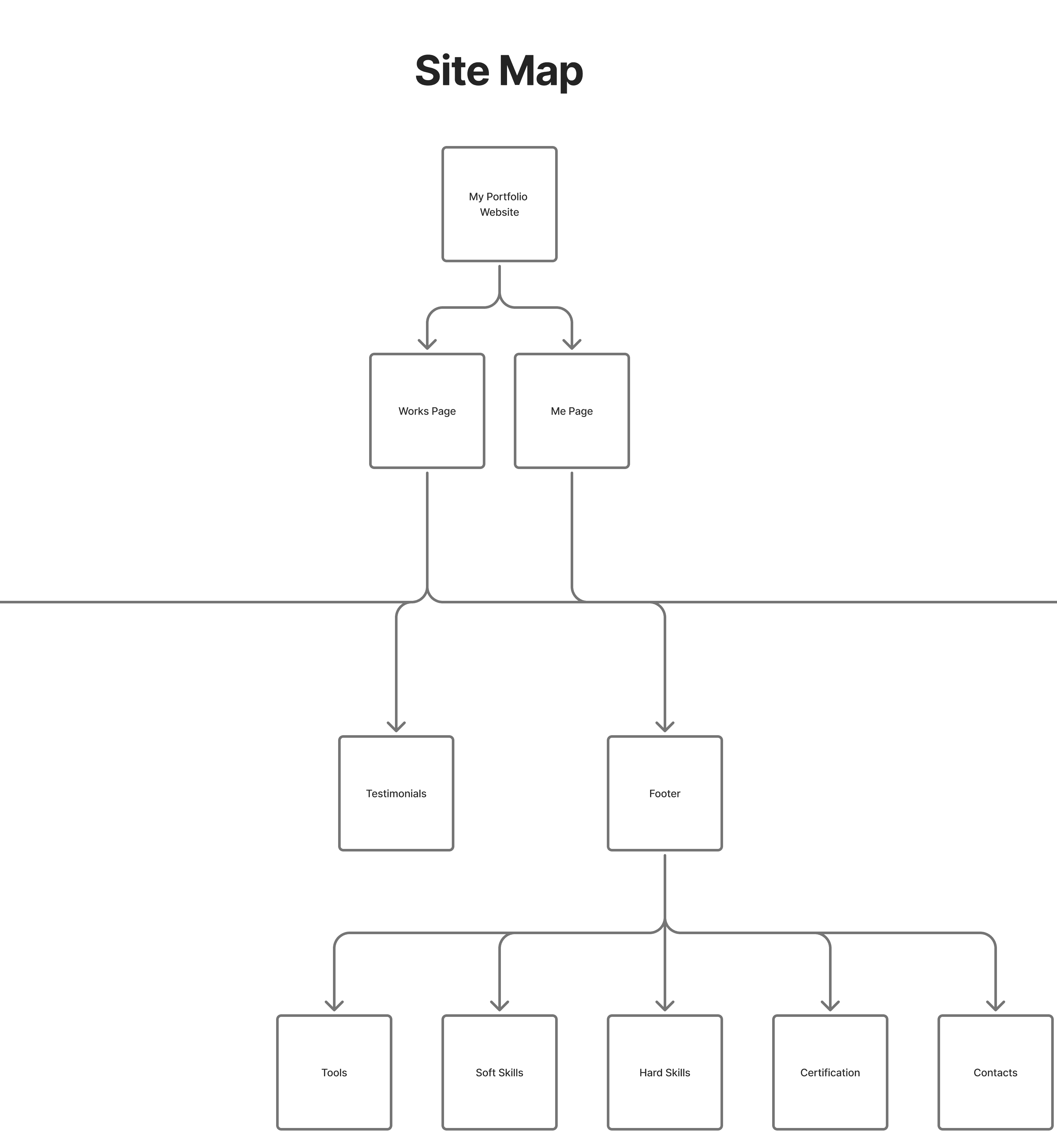
Sitemaps
I generated a comprehensive sitemap from the information architecture drafted out.

Wireframe
Wireframe sketch, illustrating key features and functionalities.


What I Did - Section by Section
Hero Section: First Impressions Matter

This is where visitors land. I designed this to:
Clearly state what I do
Show a strong visual identity
Offer immediate actions: Get my Resume or Contact Me
Motion subtly animates elements as the page loads, improving focus without distracting.
Selected Works: Filterable & Future-Proof

The heart of the homepage.
Tabs allow toggling between UIUX and Dev projects.
Cards distinguishing published from pending case studies.
CMS connection between the cards and case study pages.
This section supports growth, as I can keep adding work easily without redesigning the whole layout.
Case Study CMS Pages: Structured for Storytelling
Each project links to its own CMS-generated page with:
A "Skip to section" button for quick navigation.

A structured layout using:
Overview (with details such as project duration and tools used)
The Problem
The Solution
Design Process (from strategy implemented to high fidelity designs and iterations)
Reflection & Impact
Summary
Final Prototype
Next/Previous project buttons at the bottom
Contact CTA always available at the end
Testimonials: Trust Through Social Proof
Curated quotes from clients, and collaborators.
This section builds instant credibility, especially important for clients hiring remotely.
Footer: My Digital Snapshot

The footer helps complete the picture:
Tools: Figma, Framer, Flutter, Git, GitHub, etc.
Certifications: Google UX, Microsoft UX, etc.
Soft Skills: Teamwork, Communication, Curiosity, etc.
Hard Skills: Wireframing, Responsive UI, etc.
Contact Buttons: Always accessible.
Me Page: A Deeper Connection

Designed for users who want to know the person behind the work.
Introduces me beyond the portfolio
Shares my values, approach, and background
Offers quick contact methods
Playground button leads to creative, raw, or personal explorations
“Me” makes the portfolio feel less like a pitch, and more like a conversation.
Playground: My Creative Sandbox

This space will reflect the messiness of creativity and personal growth:
Sketches, visual experiments, code demos.
Projects not fit enough for the main portfolio.
Personal interests, hobbies, and side explorations.
It's an honest look into how I learn, play, and evolve.
Reflection & Impact
Impact
Clients and peers understood my offering faster.
Multiple viewers engaged with both the case studies and playground section, showing deep interest.
The balance of structure + creativity helped me stand out in design/dev communities.
What I Learned
A portfolio should evolve with you, not just reflect you.
Animation and structure can enhance usability when used intentionally.
Content clarity and layout are just as important as visual aesthetics.
Even without formal analytics, conversation is data. I paid attention to what people mentioned.
Summary
This portfolio is not just a website, it is a product, a personal story, and a strategic communication tool built with Framer and designed through Lean UX. Every section has a job; inform, connect, or inspire. The final result is a portfolio that speaks clearly, scrolls smoothly, and connects personally with clients, recruiters, and collaborators alike.
Final Prototype
There is no need providing a prototype when you are reading this case study writeup from the product itself 😇
So instead, I will present the url to key pages discussed;
Others pages are CMS strategically designed structure to accommodate case studies of any kind.